













Welcome to the Bendigo MSP Job Submission Portal

We’re excited to have you as part of our supplier community. This portal has been designed to streamline how we work together, making it easier to access released jobs, upload candidates, and collaborate with our recruiting team to find top talent. 


Thank you for partnering with us. We look forward to working together to deliver great talent and excellent service to Bendigo.

Directions for Use

How the Portal Works (Workflow Overview)

  1. Browse Open Roles
    Access our live job listings and view requirements, salary ranges, and hiring timelines.
  2. Submit Your Candidates
    Upload profiles, attach documents, and ensure each candidate is matched to the right role.


Submission Guidelines

To ensure a smooth submission process, please follow these guidelines:

  • Required Documents: Resume/CV (PDF preferred), and portfolio links (if applicable)
  • Required Fields: Contact details, work authorisation, availability, salary expectations, and notes
  • Profile Quality: Only submit candidates you’ve spoken with and confirmed interest
  • Maximum number of submissions per role: 2-3 CVs
  • Candidate ownership: Per role ownership 
  • Data Protection: You must obtain candidate consent prior to submission

Job Listings Preview

Explore Current Opportunities!


  • Browse a curated list of open roles across technology, operations, sales, finance, and more.
  • Each listing includes key requirements, responsibilities, and hiring timelines so you can submit the right talent for the right role.

Compliance, Security & Privacy

We take data protection seriously. Review our complete Privacy Policy and Vendor Terms at the bottom of this page.

Support

Need Help? We’re Here for You.

Visit our Help Center for FAQs, troubleshooting tips, and quick-start guides. 


***FAQ’s for supplier re MSP/Peoplebank - something like our transition portal clicking here!  (This is just an example. We will add our own hyperlink)


  • What is happening?​

    Bendigo Bank has recently appointed Peoplebank as its new Managed Service Provider (MSP) for contingent talent. 


    This means that moving forward there will be changes to the engagement of new and existing contractors for Bendigo Bank assignments.​

  • Why is this happening?

    The MSP is a comprehensive solution designed to centralise and optimise the contingent labour engagement process across Bendigo Bank.

  • Do I have to transition and if so, when?

    As a result of these changes, your current agency will no longer be managing or payrolling contractors at Bendigo Bank.  


    Your assignment, including management of your assignment and payrolling will transition to Peoplebank.  To ensure minimal disruption to you or Bendigo Bank, we’re keen to engage with you for transition of employment to Peoplebank effective November 2025.

  • What are the Peoplebank Contractor Engagement Options?
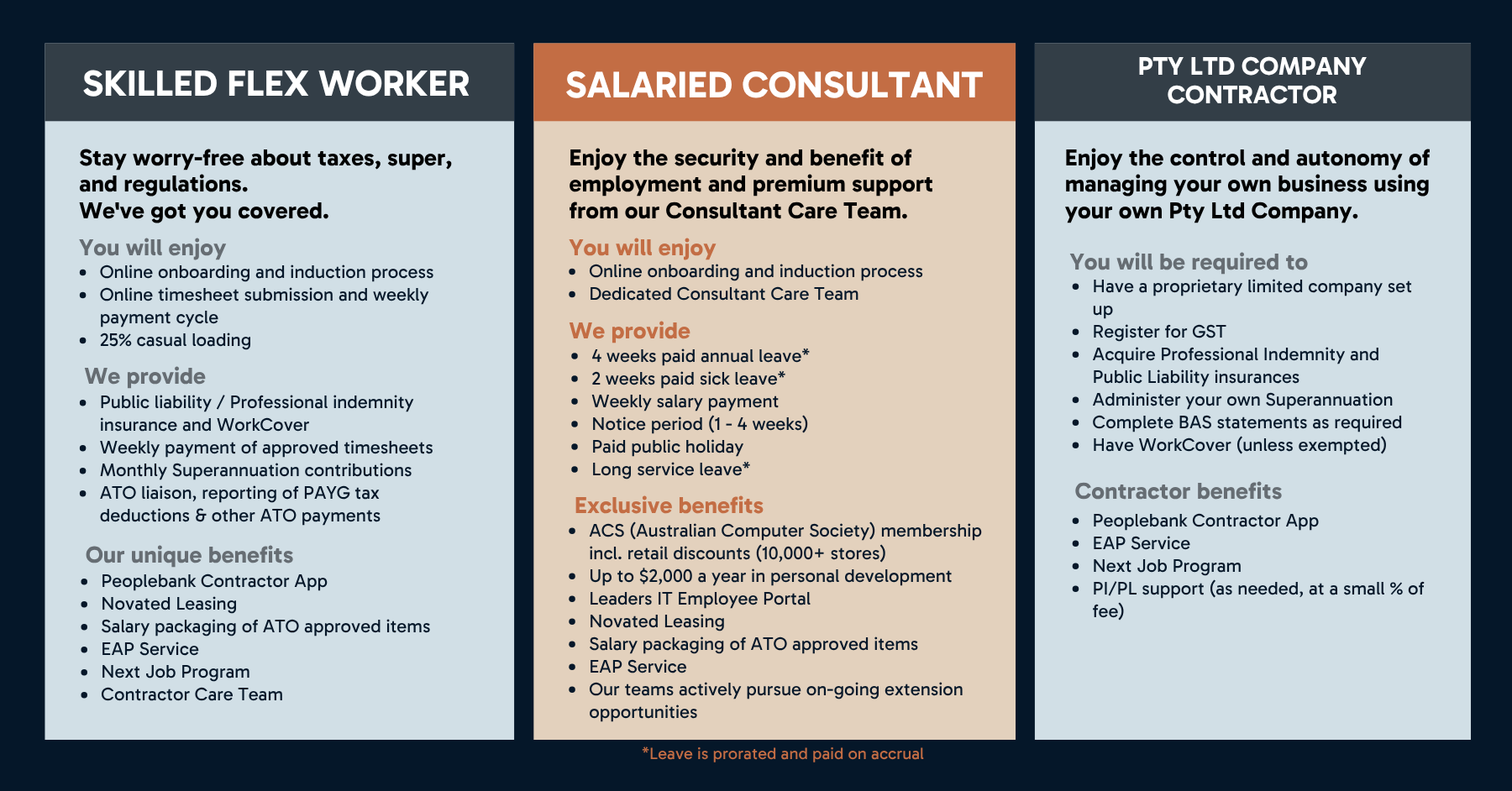

  • What happens next?

    During your transition, you will receive the following requests to complete:


    • Work rights check - this is the first step in the Peoplebank onboarding process. You will receive an email from WorkPro, to confirm your visa or citizenship status.
    • Peoplebank onboarding pack - You will review the employment agreement, as well as submit your banking, super and tax details (where required).
    • Completion of Peoplebank’s Work Health and Safety online training
  • Can I choose my own superannuation fund?​

    Yes, you can. When completing the super fund form during your onboarding process, just input your preferred super fund details. 


    If you elect to sign up to Peoplebank’s super fund, you will be enrolled with our MLC provider.  

  • When will I be paid?​

    Peoplebank pays contractors weekly in arrears​.

  • What is the timesheet process?

    Currently Peoplebank uses Fastrack 360 to record hours worked and pay contractors. 


    Your manager at Bendigo Bank will provide additional instructions if you need to use any other systems at Bendigo Bank.


    You will receive further instructions on how to use Fastrack 360 in your Peoplebank onboarding pack.

  • Where do I go for help?​

    We encourage you to speak with your current employer or the Bendigo MSP Coordinator, Jana Barovich, in the first instance​:


    • You can reach Jana at Peoplebank on 03 8080 7227 
    • And by email at: BendigobankMSP@peoplebank.com.au 
  • For Contractors

    Timesheet Process (What System do we use FT360 & When are timesheets due Need to be approved by COB Monday)


    Payment schedule


    Onboarding Process:

    Candidates will receive the following requests to complete: 

    • Work rights check - this is the first step in the Peoplebank onboarding process. You will receive an email from WorkPro, to confirm your visa or citizenship status. 
    • Reference Checks – Will the MSP initiate this?
    • Peoplebank onboarding pack - You will review the employment agreement, as well as submit your banking, super and tax details (where required). 
    • Completion of Peoplebank’s Work Health and Safety online training
  • For Suppliers

    Invoice Process


    Invoice Payment Schedule


    MSP / Vendor Engagement Rules

    • Communication guidelines (what must go through the MSP, what can go directly to the client).
    • Restrictions on contacting client managers directly.

    SLA expectations for submissions, interview feedback, status updates

Search our Jobs:

How it works

Lorem Ipsum is simply dummy text of the printing and typesetting industry. Lorem Ipsum has been the industry's standard dummy text ever since the 1500s, when an unknown printer took a galley of type and scrambled it to make a type specimen book. It has survived not only five centuries, but also the leap into electronic typesetting, remaining essentially unchanged.

Lorem Ipsum

This is paragraph text. Click it or hit the Manage Text button to change the font, color, size, format, and more. To set up site-wide paragraph and title styles, go to Site Theme.

Lorem Ipsum

This is paragraph text. Click it or hit the Manage Text button to change the font, color, size, format, and more. To set up site-wide paragraph and title styles, go to Site Theme.

Lorem Ipsum

This is paragraph text. Click it or hit the Manage Text button to change the font, color, size, format, and more. To set up site-wide paragraph and title styles, go to Site Theme.

Looking to Hire?

Featured Jobs

Contact Us

Need more information?


Complete our contact form and we will be in touch.

Contact Us